@sean Still broken, I tried rerunning the agent, but it seemed to give the same error. Looking at the History, the last successful run was on July 7. Prior to that it worked flawlessly. Hence forth it has been throwing the same error.
@Alex_MindStudio Ok here’s an extended overview of the agent I’m using:
The run looks like this (it gets stopped by the first script):
This is what the code looks like in the script where the crash happens:
(this code has worked without issues for many weeks, I don’t think the issue is here.)
// Validate configuration
if (!ai.config.csvContent) throw new Error("CSV content is required");
if (!ai.config.currentRowVariable?.startsWith("global.")) throw new Error("Current row variable must start with 'global.'");
if (!ai.config.outputRowContent) throw new Error("Output row content variable name is required");
if (!ai.config.outputTotalRows) throw new Error("Output total rows variable name is required");

// Initialize and validate current row from global variable
const currentRowVarName = ai.config.currentRowVariable.split('.')[1];
let currentRow = ai.vars.global[currentRowVarName] || 1;
if (typeof currentRow !== 'number' || currentRow < 1 || !Number.isInteger(currentRow)) {
  console.log("Invalid row number found in global variable. Resetting to 1.");
  currentRow = 1;
}

// Trim CSV content and handle empty case
const csvContent = ai.config.csvContent.trim();
if (!csvContent) {
  ai.vars[ai.config.outputRowContent] = "";
  ai.vars[ai.config.outputTotalRows] = 0;
  ai.vars.global[currentRowVarName] = 1;
  console.log("Empty CSV content provided");
  return;
}

// Parse CSV using state machine
const parseCSV = (csv) => {
  const rows = [];
  let currentField = "";
  let currentRow = [];
  let inQuotes = false;
  let currentRowRaw = "";

  const addField = () => {
    currentRow.push(currentField);
    currentField = "";
  };

  const addRow = () => {
    if (currentRow.length > 0 || currentRowRaw.trim()) {
      rows.push({
        fields: currentRow,
        raw: currentRowRaw.trim()
      });
    }
    currentRow = [];
    currentRowRaw = "";
  };

  for (let i = 0; i < csv.length; i++) {
    const char = csv[i];
    const nextChar = csv[i + 1];
    currentRowRaw += char;

    if (char === '"') {
      if (inQuotes && nextChar === '"') {
        currentField += '"';
        i++;
        currentRowRaw += nextChar;
      } else {
        inQuotes = !inQuotes;
      }
    } else if (char === ',' && !inQuotes) {
      addField();
    } else if (char === '\n' && !inQuotes) {
      addField();
      addRow();
    } else if (char === '\r' && nextChar === '\n' && !inQuotes) {
      addField();
      addRow();
      i++;
      currentRowRaw += nextChar;
    } else {
      currentField += char;
    }
  }

  // Handle last field/row
  if (currentField || currentRow.length > 0) {
    addField();
    addRow();
  }

  return rows;
};

// Parse CSV and handle results
const rows = parseCSV(csvContent);
const totalRows = rows.length;

console.log(`Found ${totalRows} rows in CSV`);

// Handle empty CSV case
if (totalRows === 0) {
  ai.vars[ai.config.outputRowContent] = "";
  ai.vars[ai.config.outputTotalRows] = 0;
  ai.vars.global[currentRowVarName] = 1;
  console.log("No valid rows found in CSV");
  return;
}

// Calculate effective row number (handling wrap-around)
let effectiveRow = ((currentRow - 1) % totalRows) + 1;
console.log(`Processing row ${effectiveRow} of ${totalRows}`);

// Extract target row
const targetRow = rows[effectiveRow - 1];
ai.vars[ai.config.outputRowContent] = targetRow.raw;
ai.vars[ai.config.outputTotalRows] = totalRows;

// Update global row counter for next execution
ai.vars.global[currentRowVarName] = effectiveRow + 1;

console.log(`Successfully extracted row: ${targetRow.raw}`);
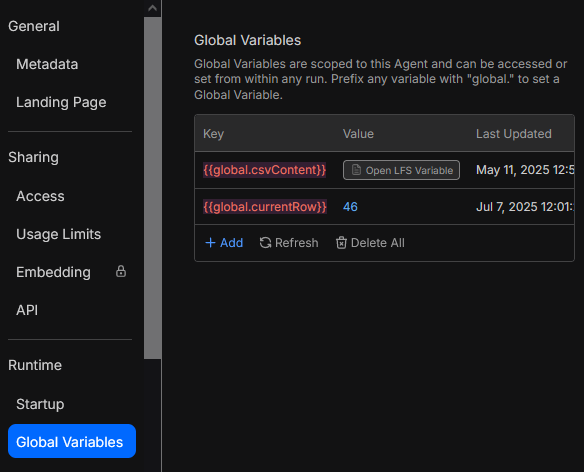
And here’s a view of the Global vars:
The bigger var in particular is basically a txt with 203 lines. A small snippet of it looks like this:
title,url,hashtags
Imperial Black Halo: A sleek trophy mech reborn from LEGO 71796 Elemental Dragon vs. The Empress Mech,https://reactorcore.itch.io/71796-imperial-black-halo-lightning-trophy-mecha,#lego #mecha #altbuild #ninjago #afol
Sauron Scissor Hands: Sinister mech forged from LEGO 71793 Heatwave Transforming Lava Dragon,https://reactorcore.itch.io/71793-sauron-scissor-hands-mech,#lego #mecha #altbuild #ninjago #instructions
Its odd, the global vars match correctly in the main flow blocks - I didn’t change them for months and they’ve been working fine.
here was a small bug in the way large global variables were being resolved by the function execution environment
That might probably it I suspect. Maybe with the roll out of Architect 2.0 some other changes accidently affected the global vars being passed within Mindstudio agents.