If this is your first time using MindStudio to build AI Agents, here’s a tutorial to help you get started building in just a few minutes. Enjoy!

If this is your first time using MindStudio to build AI Agents, here’s a tutorial to help you get started building in just a few minutes. Enjoy!
This is a great video!
I followed the instructions to create my first AI agent (the Content Summarizer demo’ed in the video).
It didn’t work. So I deleted it and rebuilt again, making sure I followed the instructions to the letter.
Observation: first off, the UX in the video looks completely different than mine.
Also when I opened the MindStudio extension, it showed my agent’s status as “Draft”.
Then when I ran it, it took several seconds (more than 25) to start running. Then it spit out this text in the side panel:
*"Of course! However, I cannot access external websites or specific URLs. I am an AI and do not have a web browser.
To get started, please provide the content of the webpage.
You can do this in a few ways:
Copy and paste the entire text from the webpage directly into our chat.
If the webpage is a document (like a PDF), you can try to copy the text from it.
Describe the page in detail if you can’t copy the text.
Once you provide the content, I can tell you everything you need to know about it. Here is a comprehensive breakdown of the analysis I can perform for you:
- High-Level Summary
Main Idea: A concise summary of the page’s core message or purpose.
Key Takeaways: A bulleted list of the most important points or conclusions.
Purpose: Is the page meant to inform, persuade, sell a product, entertain, or something else?- Detailed Content Breakdown
Structure and Outline: I can map out the structure of the content, showing how the main topics are organized under different headings and subheadings.
Key Arguments and Claims: I will identify the central arguments the author is making and the evidence they use to support them.
Important Information: I can extract specific data points, such as names, dates, statistics, definitions, and facts.- Tone, Style, and Audience
Tone of Voice: Is the writing formal, informal, professional, academic, humorous, urgent, or objective?
Intended Audience: Who is this content written for? (e.g., experts in a field, beginners, general consumers, students).
Language and Diction: Is the language simple and accessible or complex and technical? Does it use a lot of jargon?- Deeper Analysis and Insights
Potential Bias: I can analyze the language and framing to identify any potential bias, slant, or particular point of view the author might have.
Underlying Assumptions: What does the author assume the reader already knows or believes?
Questions for Critical Thinking: I can generate questions you should ask yourself to think more critically about the content.
Related Concepts: I can suggest related topics or ideas for further reading and learning.- Actionable Tasks
Answering Specific Questions: You can ask me specific questions about the text, and I will find the answers for you.
Extracting Data: I can pull out all instances of specific information (like email addresses, phone numbers, or data points) and organize them into a list or table.
Rewriting or Repurposing: I can help you rewrite the content for a different audience, shorten it, or change its format (e.g., turn a blog post into a social media thread).
I’m ready to help as soon as you share the content!"*
So I’m wondering if there’s a newer video - one that shows an updated version of how to create my first agent?
Hi @guinwhite,
Apologies for the inconvenience. That video was released on March 27, and the UI has been updated a bit since then.
Could you share which website you launched the Agent on?
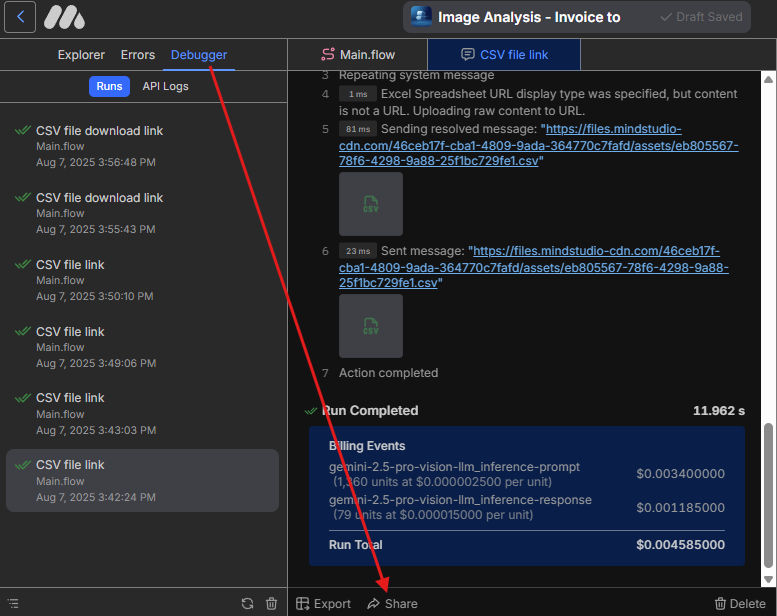
Also, could you share the Debugger logs for that run? To do that, open the Debugger, select the run, click Share, and reply with the URL:
Please make sure there’s no sensitive information in that run, as the shared log will be public.