I’m using a custom interface on a vibe coded user input block. One of the vars is configured as “Text Choice” with 4 different textual options. I use the output of the var for some title informtion bound for a Send Email block: In the body of the Send eMail block:
Essay Assessor v2b - (A MindStudio Agent)
{{student}}'s {{essayType}} Essay Assessment:
{{graded}}
… where {{essayType}} is the user input var from the Text Choice object. All woks well except that the resultant value of the var is always lowercase text, though it’s initialized caps in the input var setup. A minor issue , but it looks pretty funky as part of title information in the email content.
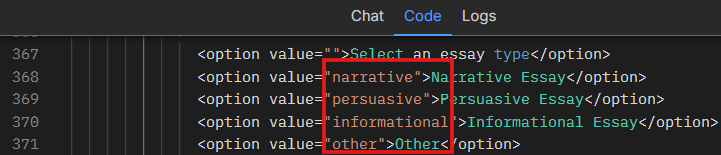
The reason why the {{essayType}} output isn’t capitalized is because of the Custom Interface code. Right now, it saves the values in lowercase, as you can see in lines 367–371:
Thank you mucho Alex … that did the trick, however, when the user input block is refreshed, I will have to make thos edits once again, no? No big deal as I know a solution.