Howdy! I have built an agent that scrapes the career pages of my sales team’s target accounts and serves up when new jobs have been added. What I’m finding is that the previous scrape for each item isn’t being saved. How do I have the scrape reference the previous scrape of that specific site rather than a single global site?
Hi @kyle.coughlin,
It depends on how you’re saving content to the global variable.
The easiest approach would be to save the scraped content from each website to its own global variable, like global.site1, global.site2, and so on. That way, everything stays organized and nothing gets mixed up.
Thanks for the response Alex! How do you go about saving each item to a unique global variable?
Hi @kyle.coughlin,
You can save the output from a block to a Global Variable by adding a Display Content block, referencing the variable in the message field, and saving it to a variable with the prefix “global.”
I put together a small agent that scrapes techmeme.com, compares the scraped content to the previous run, and saves it to a global variable:
https://app.mindstudio.ai/agents/techmeme-monitor-562de616/remix
Since you’re saving content from multiple websites, you can either add several Display Content blocks or format everything into a single JSON object. The first option is simpler, so I’d recommend starting there.
So i’m not sure if that process will work with that i have built. i’m doing this for 500+ websites. here’s a remix link of what i put together. would love your take https://app.mindstudio.ai/agents/career-page-monitoring-agent--sales-signal-alerts-679726e3/remix
Hi @kyle.coughlin,
Thanks for the details and the remix link.
If you’re tracking a large number of websites, it’s best to store the scraped results externally in a tool like Supabase. Global variables have a 50 MB limit, so this approach will let you save and monitor all sites without hitting that cap.
Depending on the tool you use, you can connect it to your Agent using blocks like Query SQL Database, Zapier, Make.com, or other integrations.
So i rebuilt the workflow to store previous scrapes in Supabase. that challenge I’m having now is the upsert step and getting that previous scrape data into supabase. I keep getting rather than the actual scraped json. I keep tying to post the remix link but it keeps getting flagged as spam
Hi @kyle.coughlin,
I’ve upgraded your forum level, so you should now be able to post links.
Could you share a link to the Debugger log instead of the remix link? Here’s how: open the Debugger, select the run, click Share, and reply with the URL:
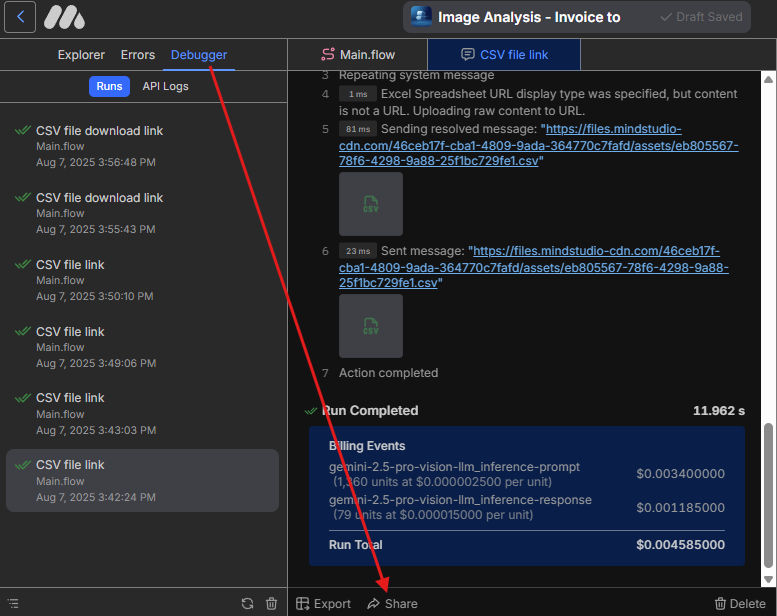
Please make sure there’s no sensitive information in that run, as the shared log will be public.
Hi @kyle.coughlin,
Thanks for sharing the link!
From what I can see, the Agent completed the run and finished after executing the Run Workflow block. Could you clarify where you’re seeing empty results? Could you share a debugger log link to those runs?
it is completing the run but i’m not getting the JSON passed into Supabase for it to be referenced on the future runs. the goal of this agent is to send alerts to my sales team when a new job is posted on a company’s career page. i need to have it reference that previous scrape. See attached Supabase screenshot

Hi @kyle.coughlin,
Your Agent is currently running into 3 key issues:
-
Some job listings are embedded or require a login. The scraper can’t access those pages and returns an empty result. You can have the scraper return a screenshot when no listings are detected, then add a Logic block that routes those cases to an OCR Image block to extract the listings. If you need to log in to access listings, you might want to integrate a third-party scraper that supports authentication.
-
When new listings are found, the Upsert State block is hitting an error. Please open those fork runs in the Debugger to see the details and adjust the query:
{
type: "error"
error: {
message: "invalid input syntax for type json"
}
}
- Variables aren’t being resolved correctly in the Logic block. Make sure to use the following format when passing JSON arrays to other blocks: {{json VariableName}}