I’m addressing a Generate Asset block situation trying to creare a downloadable PDF via a Generare Text prompt. I’m using a custom interface … loaded a previous run as test data. Challenge #1 I prompted in chat to add a Download Button. It shows up on the pdf but it doesn’t not do anything, no call to the save dialog, etc. When I edit the asset block custom interfade in the preview window, the download button works (only from the Preview pane)! … I’m messing something up somewhere. #2 Next the debugger shows my run results as HTML instead of PDF? … Thanks for taking a look ….

Hi @Avocet,
The issue happens because the format is set to PDF. Switching it to HTML will let your browser open the Print screen.
The design is first processed as HTML, which is then rendered as a PDF.
Hope this helps!
Thanks Alex … yet another million things I didn’t know!
Now when I load the test data and turn the agent, but download biutton works, but the document does not see my input variables and always shows most of the test data statically. Somewhere I heard Sean posted a video addressing this and that somehow an error was needed to be generated first? I cannot get past this hurdle … Can you help?
Hi @Avocet,
Can you please publish the Agent and share the Remix link, so I can take a closer look?
Yes Alex. Ill need sometime to do that, at the doctor prepping for surgery tomorrow. (Simple cataract surgery) .
Stay tunned good man!
Best,
Doug Parcher
Hi @Avocet, no rush at all! Wishing you a smooth surgery and a quick recovery!
Hi Alex. .. re Skitinerary USA - I’ve published the AGENT … here is the id: 09e82016-8fcc-4795-b518-0dd445117306
I have disconnected the Generate Asset block and reconnected the Display Content block. If you isolate the instance and run it, this will give you a clean run in the debugger for use as test data if that is the goal. That’s what started my woes. The two connected generate text blocks labeled “Premium Itinerary Build” and “Reasonable Itineraryt Build” are the heavy lifters and provide the itinerary detail I’m seeking - stored in {{itin}}. I have been trying for more than 2 weeks now to convert the response to HTML so the user can download it as a PDF file to their local machine. I have several orphan blocks lying around, mostly just vibe-coded user input forms or failed attempts at vibe-coding the generate asset block.. The last bit of trauma occurred when I passed a test data run to a generate asset block which initially looked so so but i then realized it was not reading my runtime variables, just using what came in the test data I loaded - each run showee the same data except for the title.. Again, the goal is to produce the result from the {{itin}} variable into a downloadable PDF (from HTML, obviously).
I hope to get this generate asset block working properly.
Thanks as always for your prompt. courteous professionalism.

Hi @Avocet,
Thanks for sharing the Agent ID!
From what I can see, the Custom Interface Designer in the disconnected Generate Asset blocks isn’t set up with proper Test Data. If you check the Test Data tab in those blocks, you’ll notice the itin variable only contains a link instead of actual text. Since LLMs can’t follow such links, they end up generating fake data or using information from other variables.
I also noticed the itin variable returns unstructured text. For the best performance, it’s better to have it return a JSON array. This helps the Custom Interface Designer work more reliably and pull the correct details.
Steps to fix:
- Update the Output Schema in the Generate Text block that populates the
itinvariable to return a JSON array - Run the Agent to generate new Test Data
- Import that Test Data into the Generate Asset block and vibe code the interface
Let me know how it goes!
Hi Alex . I’m doing something stupid. I asked Claude to look at my Gen. Text prompt and give me a JSON array template for the outpuit sample. I ran the agent without the Gen Asset block, just the display content and used that as test data. It did not break the contents of the itin variable into sections at all, just smooshed it all together … I know the JSON is probably the problem … Here is the JSON:
{
“tripSummary”: {
“resort”: “”,
“location”: “”,
“departureDate”: “”,
“returnDate”: “”,
“duration”: “”,
“numberOfSkiers”: 0,
“totalEstimatedCost”: 0,
“level”: “”
},
“transportation”: {
“method”: “”,
“distanceFromHome”: “”,
“flights”: [
{
“direction”: “”,
“airline”: “”,
“flightNumber”: “”,
“departure”: {
“airport”: “”,
“time”: “”,
“date”: “”
},
“arrival”: {
“airport”: “”,
“time”: “”,
“date”: “”
},
“class”: “”,
“pricePerTicket”: 0,
“numberOfTickets”: 0,
“totalCost”: 0
}
],
“groundTransportation”: {
“type”: “”,
“provider”: “”,
“model”: “”,
“pickupLocation”: “”,
“dailyRate”: 0,
“numberOfDays”: 0,
“totalCost”: 0,
“gratuity”: 0,
“totalWithGratuity”: 0
},
“transportationTotal”: 0
},
“accommodation”: {
“propertyName”: “”,
“propertyType”: “”,
“bedConfiguration”: “”,
“sleeps”: 0,
“amenities”: ,
“smokingAllowed”: true,
“petsAllowed”: false,
“nightly_rate”: 0,
“numberOfNights”: 0,
“accommodationSubtotal”: 0,
“resortFee”: 0,
“cleaningFee”: 0,
“accommodationTotal”: 0
},
“liftPasses”: {
“resort”: “”,
“numberOfPasses”: 0,
“passType”: “”,
“numberOfDays”: 0,
“regularPricePerDay”: 0,
“seniorDiscountPricePerDay”: 0,
“totalPerPerson”: 0,
“totalForGroup”: 0,
“discountSavings”: 0,
“includes”:
},
“equipmentRentals”: {
“skiRentals”: {
“numberOfSets”: 0,
“packageType”: “”,
“included”: ,
“dailyRatePerSet”: 0,
“numberOfDays”: 0,
“totalPerSet”: 0,
“totalForSkis”: 0
},
“snowboardRentals”: {
“numberOfSets”: 0,
“packageType”: “”,
“included”: ,
“dailyRatePerSet”: 0,
“numberOfDays”: 0,
“totalPerSet”: 0,
“totalForSnowboards”: 0
},
“deliveryService”: {
“description”: “”,
“cost”: 0,
“gratuity”: 0,
“total”: 0
},
“bundleDiscount”: 0,
“equipmentTotal”: 0
},
“dining”: {
“numberOfDinners”: 0,
“numberOfPeople”: 0,
“restaurants”: [
{
“night”: 0,
“restaurantName”: “”,
“cuisine”: “”,
“reservationTime”: “”,
“estimatedCostPerPerson”: 0,
“subtotal”: 0,
“gratuity”: 0,
“total”: 0
}
],
“diningTotal”: 0
},
“snowReport”: {
“resort”: “”,
“forecastPeriod”: “”,
“baseDepth”: “”,
“recentSnowfall”: “”,
“forecast”: “”,
“temperature”: “”,
“trailsOpen”: “”,
“liftsOperating”: “”,
“conditions”: “”
},
“backupResorts”: [
{
“name”: “”,
“location”: “”,
“distanceFromDeparture”: “”,
“smokingPolicy”: “”,
“petPolicy”: “”,
“snowboardingAllowed”: true,
“estimatedPricing”: “”
}
],
“discountsApplied”: [
{
“type”: “”,
“savings”: 0
}
],
“costBreakdown”: {
“transportation”: 0,
“accommodation”: 0,
“liftPasses”: 0,
“equipmentRentals”: 0,
“dining”: 0,
“subtotal”: 0,
“estimatedTaxes”: 0,
“contingencyBuffer”: 0,
“totalEstimatedCost”: 0
}
}
I’m reallhy at a loss … The Gen Asset block does not know anythng about the {{itin}} varable? What am I doin wrong?
Hi @Avocet,
Could you share the Debugger logs for that run? To do that, open the Debugger, select the run, click Share, and reply with the URL:
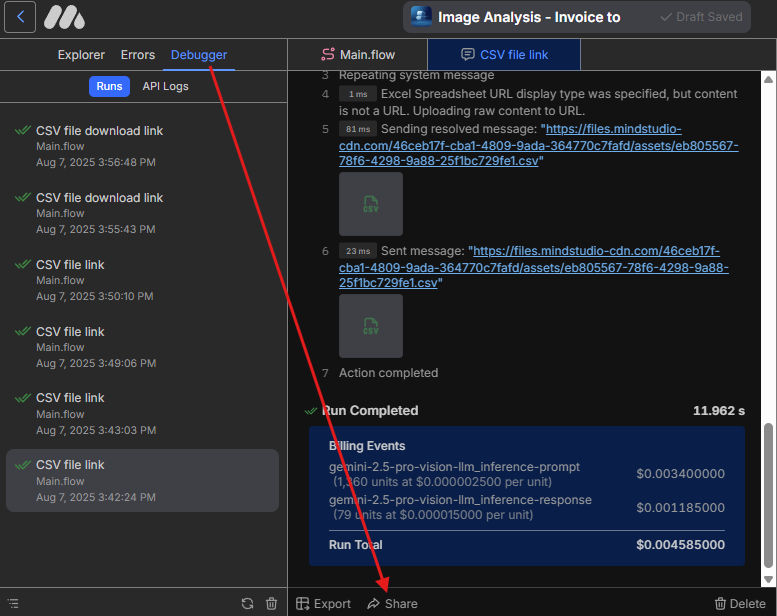
Please make sure there’s no sensitive information in that run, as the shared log will be public.
Not sure if I;ve got the right run . but here it is:
Hi @Avocet,
Thanks for sharing the link!
From what I can see, the prompt might be a bit too broad and could be confusing the LLM since it includes tasks it can’t actually perform, like “book SUV rental”
You might also want to reinforce the prompt by providing instructions to follow the sample output structure and not simply return text. Also, your sample output only lists the keys, consider adding example values you’d expect the LLM to fill in, for example:
“resort”: “Boreal”,
“location”: “California”
At last, keep in mind that only Perplexity models can search online. Other LLMs rely on their built-in knowledge, which has a specific cutoff date. If your use case requires live data, try switching to a Perplexity model.